Téigh díreach chuig an bpríomhábhar
Lógó ABAIR

Léitheoir Gréasáin

Déanann an Léitheoir Gréasáin an téacs ar aon leathanach gréasáin a léamh os ard le guthanna nádúrtha Gaeilge. Déantar gach líne agus gach focal a aibhsiú de réir mar a léitear iad, sa dóigh is gur féidir leat an téacs a leanúint. Rinneadh an áis seo a fhorbairt dóibh siúd ar fearr leo an éisteacht ná an léitheoireacht: saor in aisce, oscailte don phobal i gcoitinne, agus forbartha ag togra neamhbhrabúis.

Faigh spléachadh ar an dóigh a oibríonn sé

Cuir an Léitheoir Gréasáin le do bhrabhsálaí

Breiseán brabhsálaí do Chrome, Edge, Brave, Opera agus Firefox. Tá sé réidh le dhul chomh luath is atá sé suiteáile agat: barra uirlisí beag ar foluain ar féidir leat a tharraingt aon áit ar an leathanach. Níl le déanamh agat ach an cnaipe seanma a bhrú agus éisteacht. Níl gá le cuntas a chrúthú agus ní dhéantar rianú ar do chuid úsáide.


An dóigh le é a úsáid

Uair amháin atá an breiseán suiteáilte agat, beidh an barra uirlisí ar foluain ar gach leathanach ar a mbeidh tú. Seo mar a oibríonn sé.

1

Léigh an leathanach iomlán

Brúigh ar Seinn ar an bharra uirlisí agus déanfaidh an Léitheoir Gréasáin an leathanach iomlán, ón tús, a léamh, ag déanamh aibhsithe ar gach abairt agus gach focal de réir mar a léitear iad.

Tá an Ghaeilge ar cheann de na teangacha is sine san Eoraip.Labhraítear go laethúil í sa Ghaeltacht gach lá.Tá pobal úr cainteoirí ag fás ar líne.

2

Léigh an mhéid atá roghnaithe agat

Déan abairt faoi leith a roghnú trí bhrú air agus an luch a tharraingt ar a mhullach. Beidh cnaipe Léigh le feiceáil ansin os a chionn, agus níl le déanamh ach sin a bhrú chun é a léamh.

Tá an tionscadal ABAIR lonnaithe i gColáiste na Tríonóide. Forbraíonn an fhoireann guthanna sintéiseacha don Ghaeilge. Tá siad ar fáil saor in aisce.

Rialaithe an bharra uirlisí

Tá roinnt cnaipí éagsúla ar an bharra uirlisí. Seo an fheidhm atá ag gach ceann acu.

Tarraing an rialtánFaigh greim ar an rialtán poncaithe leis an bharra uirilisí a tharraingt go háit ar bith ar mian leat.
Seinn / Cuir ar sosTosaigh ag léamh an leathanaigh os ard. Déan é a bhrú arís chun sos a chur leis an léamh, agus arís eile le leanúint ar aghaidh arís.
StopStop ag léamh go hiomlán agus glan aon rud atá aibhsithe ar an leathanach.
Gabh siarGabh siar go tús an ailt agus éist arís leis.
Gabh ar aghaidhGabh ar aghaidh go dtí'n chéad alt eile agus lean ort ag léamh ó sin ar aghaidh.
VolumeOpen a volume slider, like on a video player, to make the voice louder or quieter.
SettingsOpen the settings menu, where speed, dialect, voice and the reading toggles live.
CuidiúOscail an treoirleabhar ionsuite ina bhfuil treoracha a théann céim ar chéim
ÍoslaghdaighCollapse the toolbar to a small Web Reader button so it stays out of your way. Click that button to bring it back.
LuasIn the settings menu, drag the slider to slow the voice right down or speed it up, from 50% to 150%.
Canúint & guthAlso in the settings menu: switch between dialects and choose the speaker you like best.
Ceisteanna coitianta

Ní fheictear domh an painéal rialaithe

Make sure the extension is turned on. Click the Web Reader icon in your browser toolbar. The round power button at the top of the menu glows green when the extension is on.

Níl aon fhuaim le cloisteáil agam

Cinntigh go bhfuil fuaim do ríomhaire casta ar siúl go hard agat. Cinntigh fosta go bhfuil tú ceangailte leis an idirlíon - teastaíonn nasc idirlíne ón léitheoir chun go n-oibróidh sé

Tá fuaim aisteach ag an ghuth

Bain triail as an chanúint nó an guth a athrú (leis an deilbhín rotha ar an bharra uirlisí). Tá fuaimeanna éagsúla ag na canúintí go léir!

Tá an barra uirlise sa mhullach ar ábhar an leathanaigh

Is féidir leat an barra uirlisí a bhogadh trí ghreim a fháil ar an rialtán poncaithe ar thaobh na láimhe clé. Is féidir fosta cliceáil ar an chnaipe íoslaghdaithe chun é a dhéanamh níos lú, agus ar an deilbhín callaire chun é a dhéanamh mór arís.

Cén dóigh ar féidir liom an breiseán a chasadh as?

Click the Web Reader icon in your browser toolbar, then click the round power button at the top of the menu. It stops glowing green, and the toolbar disappears until you switch it back on.

Cuardach focal ar Teanglann

Fad is atá an Léitheoir Gréasáin ar obair is féidir cuardach san fhoclóir údarasach Gaeilge, Teanglann, a dhéanamh trí chliceáil ar aon fhocal faoi dhó. Beidh míniú an fhocail agus a ghramadach le feiceáil gan leathanach úr a fhoscailt nó d'áit sa téacs a chailleadh.

Dictionary content is from Teanglann.ie, developed and operated by Foras na Gaeilge. Web Reader opens their entries directly and stores no dictionary content of its own.

Chuir an ceoltóir draíocht ar an slua le gach nóta a sheinn sé.
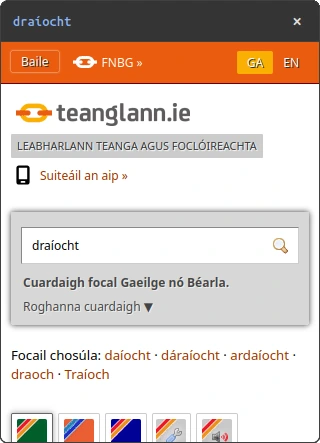
Iontráil foclóra don fhocal 'draíocht' ar Teanglann.ie

Ag suiteáil an Léitheora Gréasáin do shuíomh gréasáin

Web Reader can be embedded in any website with a single script tag. The script is served from our CDN at webreader.abair.ie, giving every visitor the same floating controls and Irish read-along. The script can also be downloaded from the CDN and pasted directly into your application. It is provided free of charge.

index.html
<script src="https://webreader.abair.ie/script.js" async></script>

Every release keeps its own permanent address, so a version you pin stays available. Use /script.js for the newest build, /v1/script.js to follow 1.x releases, or /v1.3.0/script.js to stay on one exact version.

What the reader reads

The reader picks one container on the page and reads only what is inside it. Getting this right is what makes a page sound correct.

index.html
<body>
  <header></header>

  <main>
    <h1>Alt an Bhile</h1>
    <p>Is baile fearainn é seo i gContae Dhún na nGall.</p>
  </main>

  <footer></footer>
</body>
Put your content in
Without a
or
element the reader falls back to the whole , so visitors hear the navigation menu, the cookie banner and the footer before reaching the article.
Tags that are read
Only p, h1h6, li, td, th, blockquote, button, a and figcaption are read. Text in a
or is skipped. Wrap it in a

instead.

Order follows your HTML
Reading order is source order. Re-ordering visually with CSS does not change what is read first.
Avoid reading things twice
A
Configuration

Optional. Define window.WebReaderConfig before the script tag to override the defaults.

config
<script>
  window.WebReaderConfig = {
    locale: 'ga',
    panelPosition: 'bottom-right',
    collapseByDefault: true,
    speed: 1.0,
    dialect: 'ga_CO',
    voice: 'ga_CO_snc_piper',
    wordLookup: false,
    announceMedia: false,
    disableTeanglann: true
  };
</script>

The reading defaults below (speed, dialect, voice, wordLookup, announceMedia) seed a visitor's settings on their first visit only. After they change a setting in the panel, their own choice is kept. disableTeanglann is a hard lock applied on every load.

contentSelector
A CSS selector for the element to read, e.g. '#article'. Use this when you cannot add a
element, or the reader picks the wrong part of the page.
ignoreSelector
A CSS selector for elements never to read, e.g. '.ad, .related'. Use it to keep ads, share bars and related-link blocks out of the reading.
locale
Interface language. 'ga' (Irish) or 'en' (English). Defaults to 'ga'.
panelPosition
Which corner the panel starts in: 'bottom-right' (default), 'bottom-left', 'top-right', 'top-left', or 'remember' to keep where the visitor last dragged it. Pixel coordinates are not supported.
collapseByDefault
true (default) starts collapsed; false starts expanded. A visitor's own toggle is remembered in localStorage.
speed
Default playback speed, from 0.5 (slowest) to 1.5 (fastest); 1.0 is normal. First-visit default.
dialect
Default dialect: 'ga_CO' (Connemara), 'ga_UL' (Donegal), 'ga_MU' (Kerry), or 'ga_MU_ar' (Waterford). Picks that dialect's default voice unless voice is also set.
voice
Default voice id, e.g. 'ga_CO_snc_piper' (Sibéal) or 'ga_UL_anb_piper' (Áine). Sets the matching dialect automatically.
wordLookup
Whether double-click Teanglann lookup starts on. true or false (default). Needs disableTeanglann: false. First-visit default; visitors can still toggle it.
announceMedia
Whether spoken "Link:" and "Image:" announcements start on. true or false (default).
disableTeanglann
Hard lock, on by default. true (default) removes Teanglann lookup entirely: no double-click, no Alt+L, and the toggle is hidden from the panel. Set false to allow it. Applied on every load, overriding wordLookup.
React / Next.js integration

The script must run in the browser. In React or Next.js, inject it from a client-side useEffect.

1. Add WebReader.tsx

WebReader.tsx
"use client";

import { useEffect } from "react";

export default function WebReader() {
  useEffect(() => {
    if (document.getElementById("webreader-embed-script")) return;

    window.WebReaderConfig = {
      locale: "ga",
      panelPosition: "bottom-right",
    };

    const script = document.createElement("script");
    script.id = "webreader-embed-script";
    script.src = "https://webreader.abair.ie/script.js";
    script.async = true;
    document.body.appendChild(script);

    return () => {
      window.WebReader?.destroy();
      document.getElementById("webreader-embed-script")?.remove();
    };
  }, []);

  return null;
}

2. Mount it in the root layout

app/layout.tsx
import WebReader from "./WebReader";

export default function RootLayout({ children }) {
  return (
    <html>
      <body>
        {children}
        <WebReader />
      </body>
    </html>
  );
}
Adding it to a website: FAQ

The panel doesn't appear after installation

Confirm the tag is inside <body> rather than <head>, the file is saved, and do a hard refresh (Ctrl/Cmd + Shift + R).

The panel starts collapsed

That's the default. Expanding the panel persists the choice to localStorage for the visitor's next visit.

Can I control the reader from my own code?

Yes. Once the script has loaded, window.WebReader exposes setEnabled(false) to stop playback and hide the panel, and setEnabled(true) to bring it back, alongside play(), pause(), stop(), configure(options) and destroy(). Use setEnabled to run the reader only on the pages or languages you choose. The script stays loaded, so switching back is instant.

Are non-Irish voices available?

Not yet. Every synthesised voice is Irish today, and the interface alone can be switched to English with locale: 'en'. Bilingual voices are in active development. Code-switching comes first, so an Irish voice handles English words and phrases inside Irish text, with Hiberno-English versions of our voices to follow.

Is there a usage fee?

No. The service is provided free of charge by the ABAIR research project. You do not have to add anything: the collapsed panel button already carries the ABAIR mark, and that is attribution enough. If you would also like to credit us in your own words, a line in your footer or accessibility statement such as "Irish text-to-speech by ABAIR, Trinity College Dublin", linked to abair.ie, is very welcome.

Where do I report issues?

Contact the ABAIR team through the form at abair.ie.

Accessibility and privacy

Web Reader is built to WCAG 2.1 AA: keyboard accessible, ARIA-labelled, with colour-blind-friendly highlight presets and an Irish interface alongside English. No account, cookie, or tracking of any kind. The text being read is sent to ABAIR only to generate the audio.

Built to WCAG 2.1 AAScreen-reader compatibleKeyboard navigableIrish & English interfaceNo tracking
DCHG
S20
Crannchur Náisiúnta
COGG
Trinity College Dublin